Links
The real ones first, then a sample show you can click through as three different people.
realityshow.com/production/🖋 Daisy's show · producers' pageAll Female Ink (working title). Spider and Daisy are main characters, not invited yet.realityshow.com/production/?s=28e312e9-c26a-4737-82f4-5ff7fc611c37🎬 Running a show (team training)13 steps with audio: casting, the cast dashboard, scans, places, shoot days, the 48-hour emails, releases, directors and paying them.realityshow.com/hire/production/📍 Daisy's show · release linkFor walk-on guests and the owner of the shop, on set. Same link as the QR code on the Releases tab.realityshow.com/release/?r=8ad74701-95fa-4d17-a3e7-51fd6daddb53Sample show
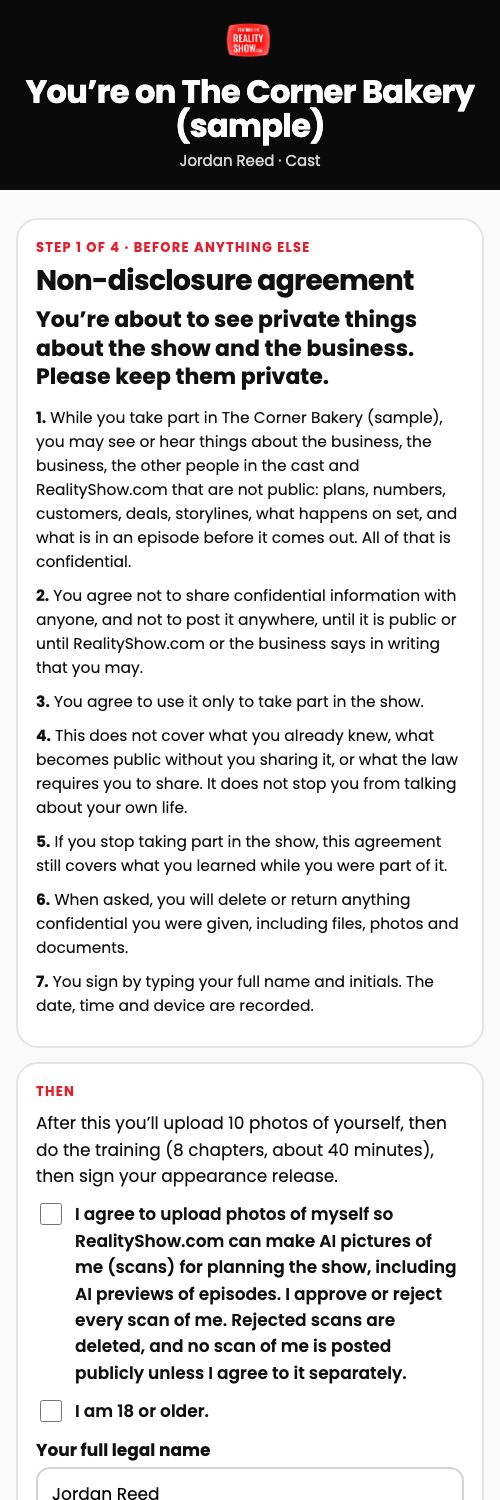
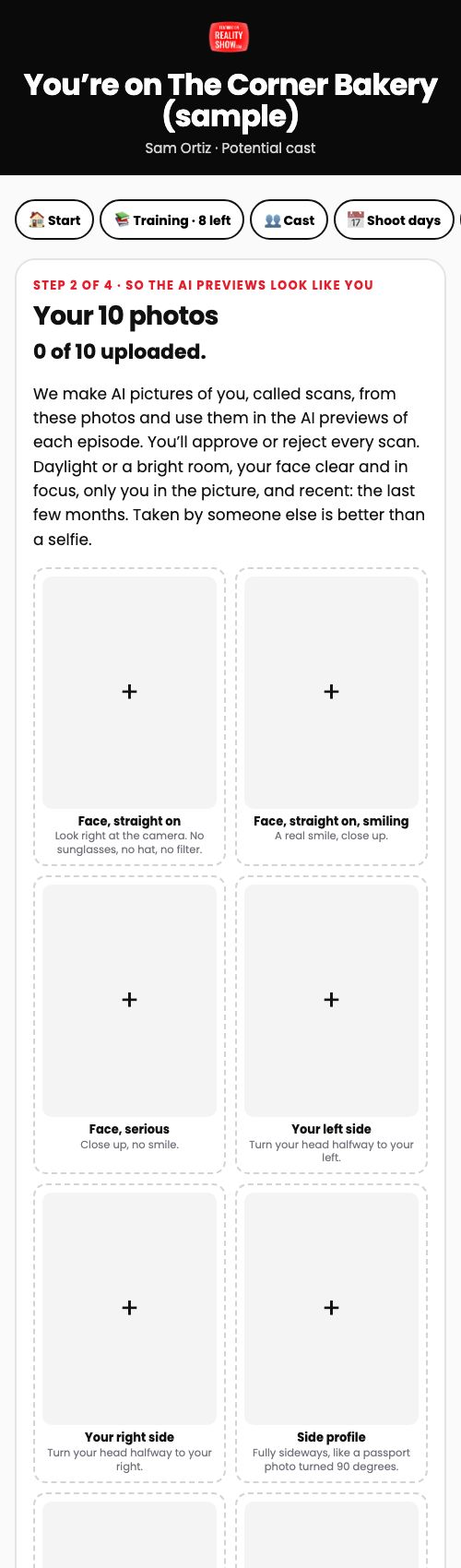
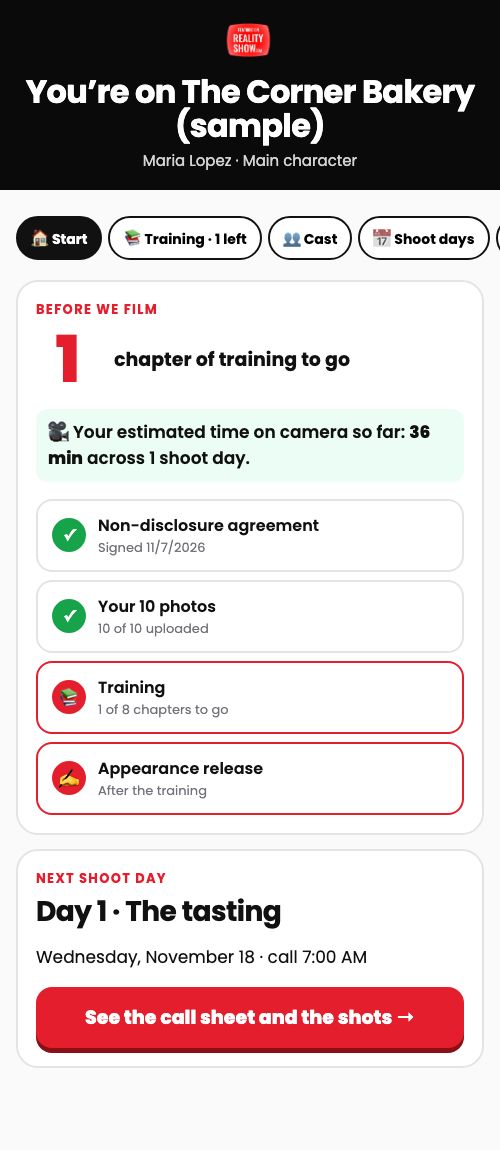
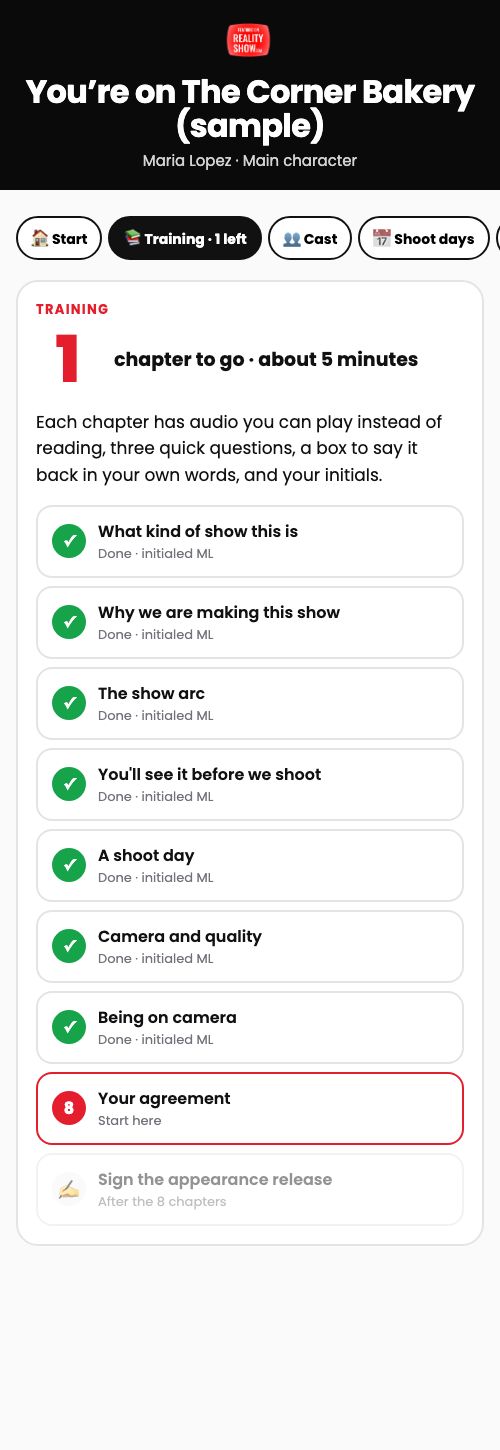
realityshow.com/production/?s=7a7e5dcb-dd48-4328-a55f-d220630df6031 · Jordan, just invitedWhat someone sees the first time they open their invite: the NDA.realityshow.com/cast/?c=ac6b4219-7a0d-44cf-b3ba-90d9c6d55a2f&team=12 · Sam, NDA signedNext: the 10 photo slots. The training is locked until they're in.realityshow.com/cast/?c=9d149342-2b5f-464d-89c1-684d9fc2cfb9&team=13 · Maria, almost donePhotos in, 7 of 8 chapters done. Open the Shoot days tab for the call sheet and the shots.realityshow.com/cast/?c=803664a8-df1d-4f1e-9a79-fd0cfe2f038c&team=1🎥 Sample director pageWhat a director sees once verified: the booking, the pay, check-in, the call sheet, the shot list and the footage upload.realityshow.com/crew/?k=5ca9e335-4f8f-4528-b1e8-1582150f5e93&team=1🖊 Sample release linkWhat a walk-on guest or a location owner fills in on their phone.realityshow.com/release/?r=c5497de3-626c-43c0-99a5-cbb0d0d2aa18The flow
From starting a show to the shoot day. Who does each step is marked.
- ProducersStart the show
On /production/, pick the client and tap Start. Every show starts from the same template: six arc beats, five episodes (or the ones from their show plan), Day 1, camera level Pro, you as the contact, and the client as main character.
- ProducersWrite the season
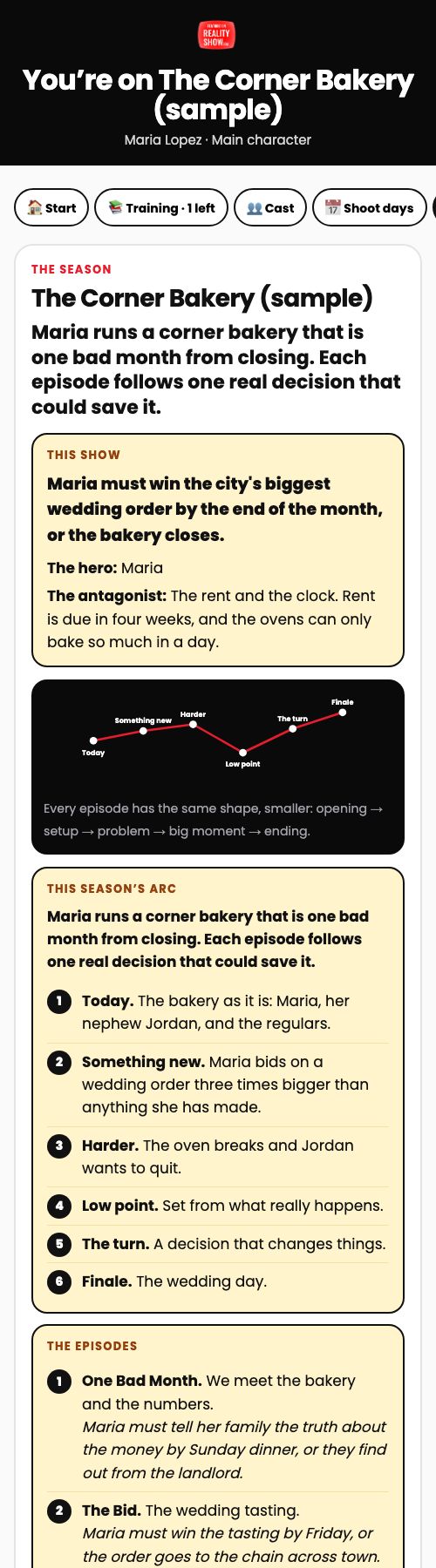
Season tab: working title, logline, why we're making it, the story line (the hero must do X by Y, or Z happens), the hero and the antagonist, the arc, and each episode with its own story line and AI preview link.
- ProducersAdd the cast
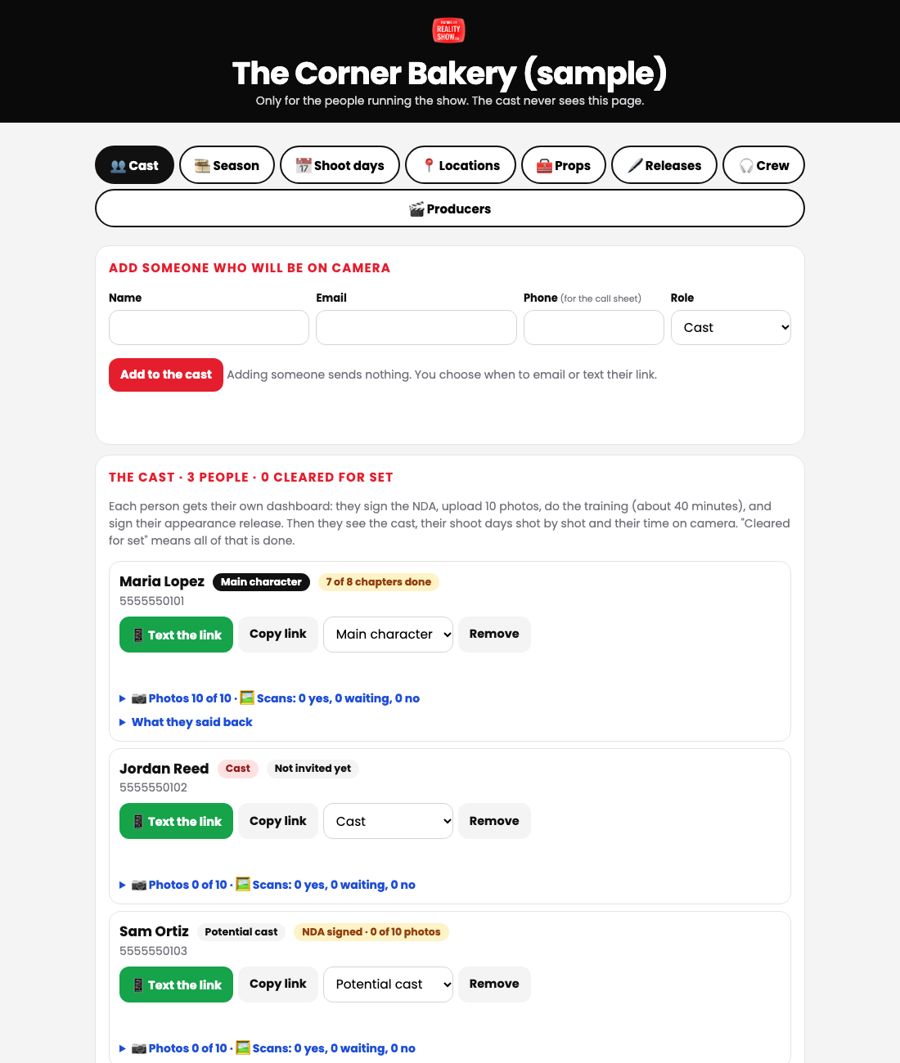
Cast tab: first name, email, phone (for the call sheet) and role: main character, cast, or potential cast. The client can do this too from the same page. Adding someone sends nothing.
- ProducersInvite them
Tap ✉️ Email the invite, or 📱 Text the link from your own phone.
- Person on cameraSign the NDA
The first screen they see. A standard non-disclosure agreement, plus the okay to make AI pictures (scans) from their photos, 18+, full name and initials.
- Person on cameraUpload 10 photos
Ten labeled slots: face straight on, smiling, serious, left side, right side, profile, waist up, waist up at work, full body, full body relaxed. Private: only producers see them.
- ProducersScans make themselves
When the 10th photo is in, the server makes six scans and emails the person to check them. You get a note. Make scans now on their card makes more.
- Person on cameraDo the training
8 chapters, about 40 minutes, with a big countdown ("5 chapters to go"). Each chapter: about a minute of audio, a picture, three questions they must get right, say it back in their own words (type or talk), initials.
- Person on cameraApprove their scans
Photos tab: Yes, that's me, or No, delete it. A no deletes the picture.
- Person on cameraSign the appearance release
Name, face, voice and story in the show and its ads; no pay promised; final edit is ours; their off-limits list. Then they're cleared for set and get a certificate.
- ProducersPlan the shoot days
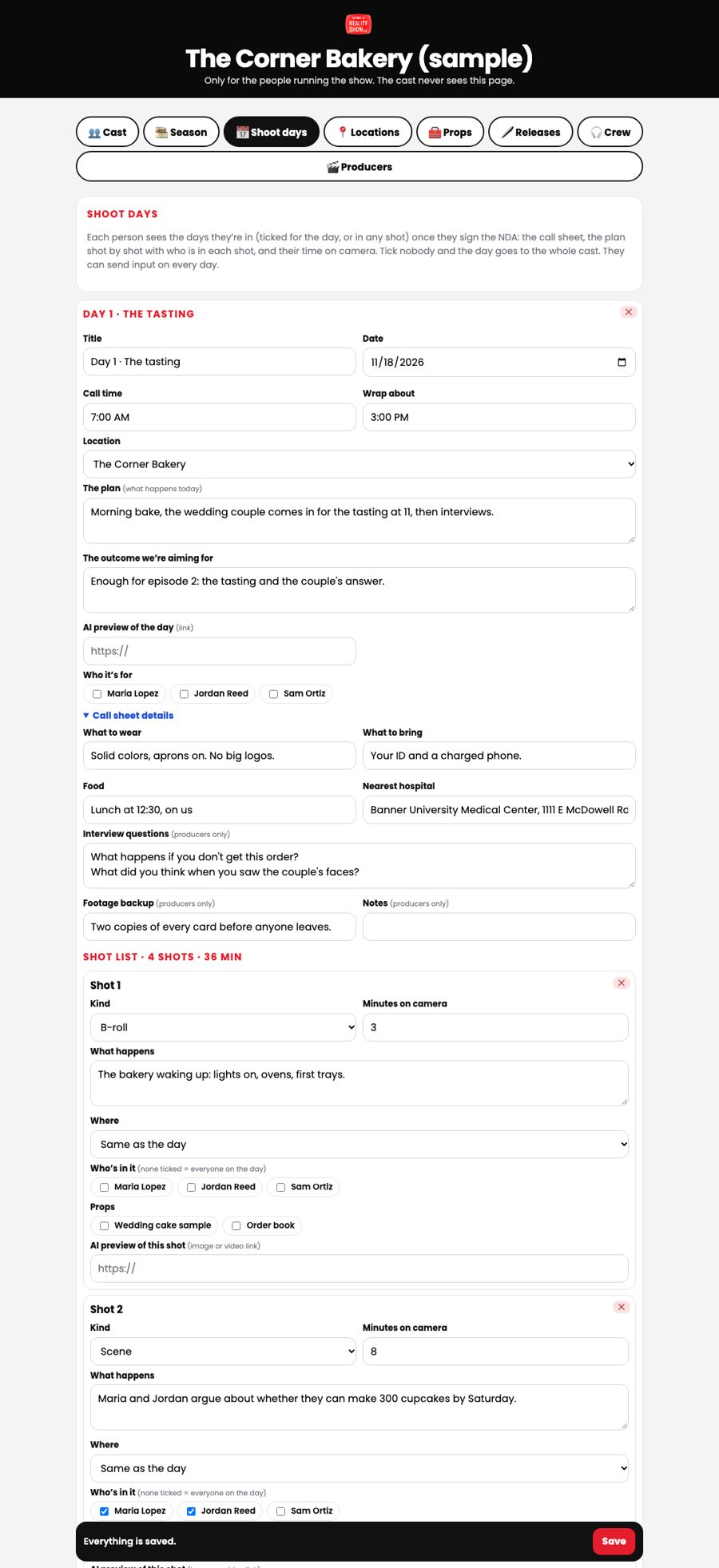
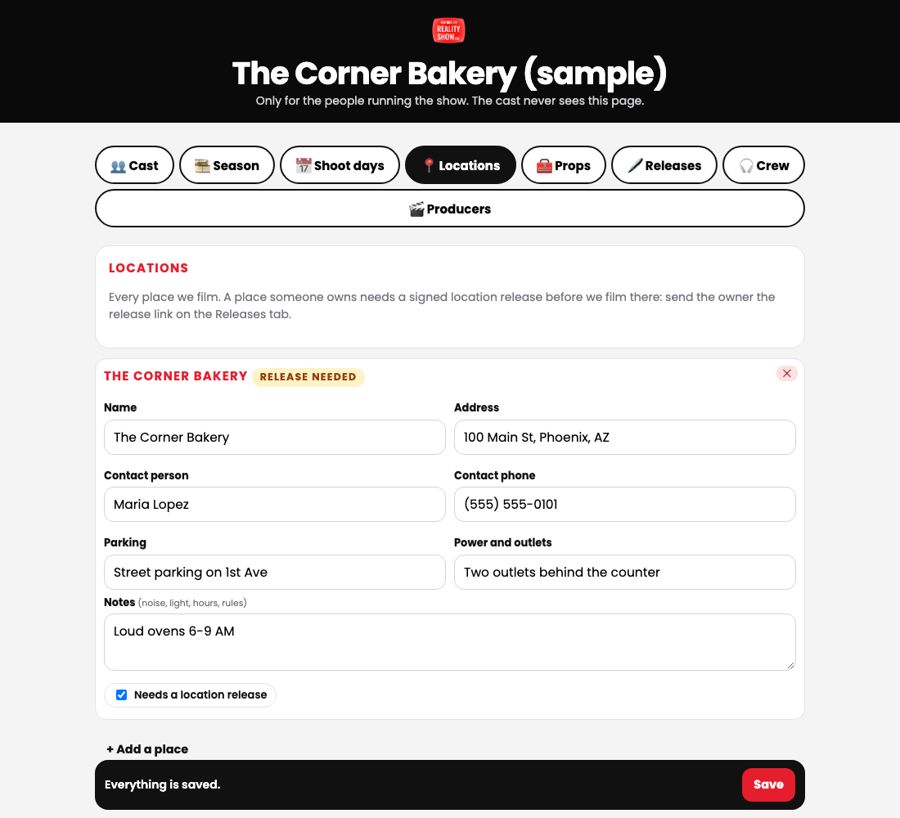
Locations (each one Release, Public or Guerrilla: a missing release never stops a shoot), props, crew, and each day: call and wrap, location, plan, outcome, what to wear and bring, food, nearest hospital, interview questions, footage backup, and the shot list (kind, what happens, who's in it, where, props, minutes, AI preview).
- Person on cameraSee the day and speak up
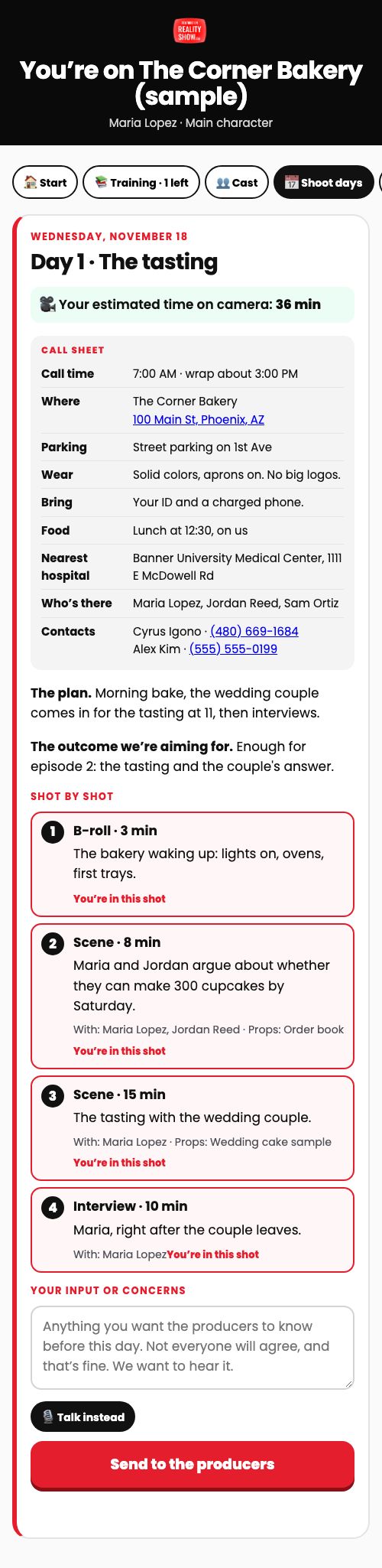
Shoot days tab: the call sheet, the shots with "You're in this shot", their time on camera, and a box for input or concerns. Every note emails you.
- ProducersBook a director
From the verified pool (invite, NDA, 8 chapters of training, a 3-minute test shoot you watch and verify). On the show's Directors tab, pick them for a day with two amounts: show-up and footage.
- On its own48 hours before
On their own: everyone on camera that day gets the day and anything they still need to sign, listed guests get the release link, booked directors get the call sheet. You're copied and get one summary.
- On setShoot day
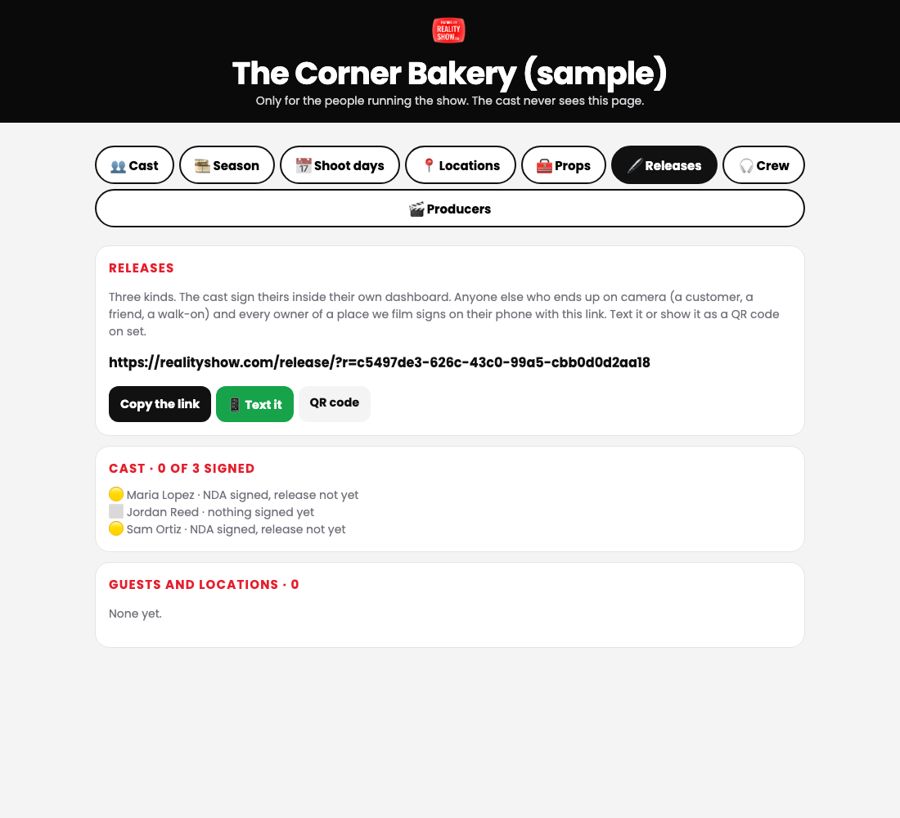
🖨 Print the call sheet (it has everyone's phone numbers). The director checks in on their dashboard (payment one). Anyone else who ends up on camera signs the release link on their phone; show the QR code.
- DirectorFootage the same night
The director uploads the original files from their phone (to our storage, up to 5 GB a file) and taps send. You watch them on the Directors tab and tap Footage okay (payment two), or ask for more.
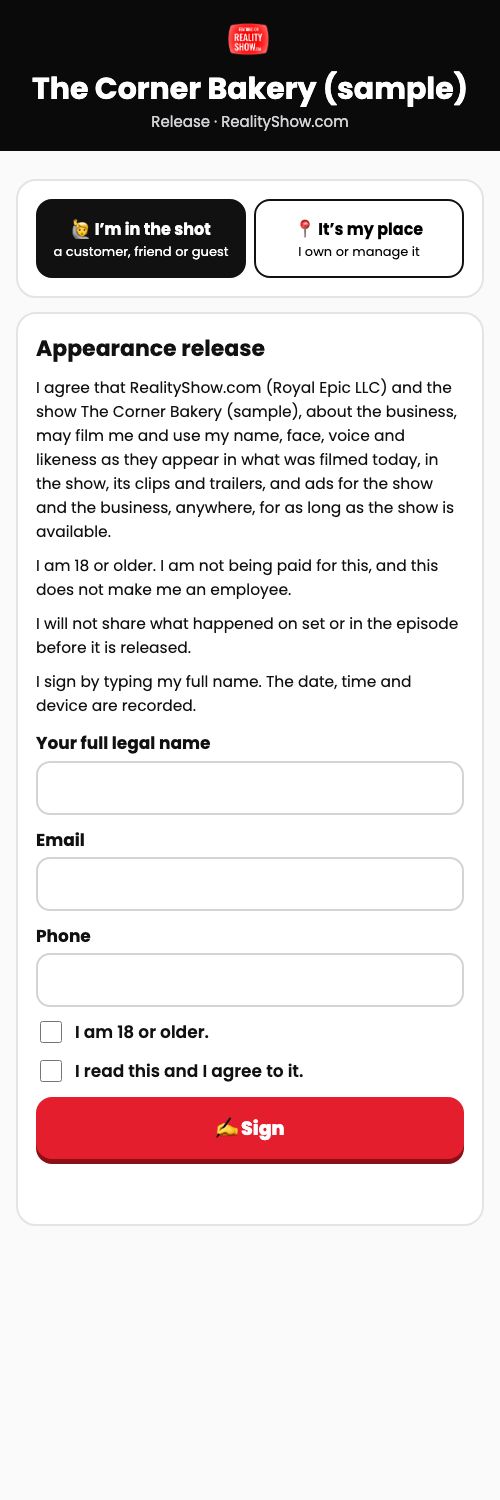
What the person on camera sees
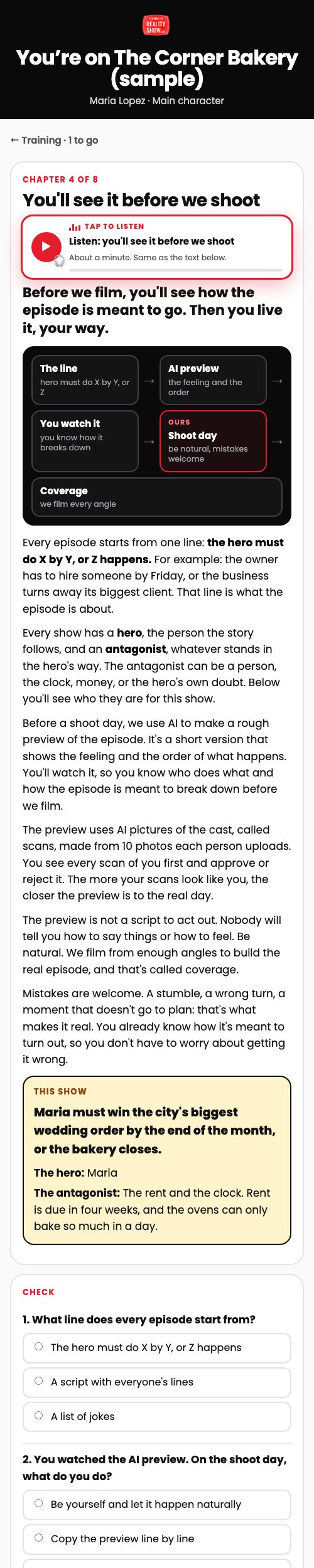
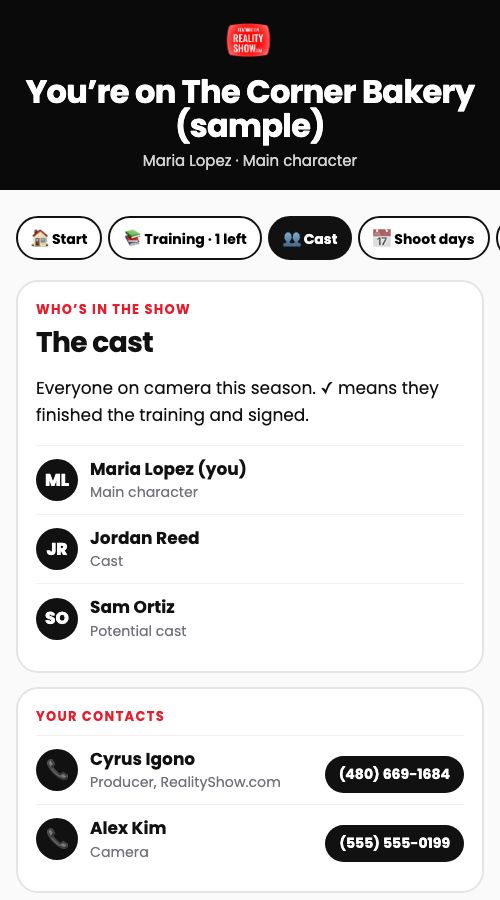
On their phone, from their own link. They never see the producers' page, anyone else's photos or phone number, or the interview questions. Tap a picture to see all of it.
What producers see
Our team and the client, from the show's producers' link. Tabs: Cast, Season, Shoot days, Locations, Props, Releases, Crew, Producers.
The invite email
Goes out only when a producer taps ✉️ Email the invite. From Cyrus at RealityShow.com, replies come to you, and you're copied.
Subject: [First name], you're invited to [the show]
[First name], you're invited to be on [the show], the show about [the client], as [cast / main character / potential cast]. The button below opens your cast dashboard for the season.
In it you'll see who else is in the cast, every shoot day you're in with its call sheet, the plan for each day shot by shot with who is in each shot, and about how much time you'll be on camera. You can send us your input or concerns before every shoot day.
When you first open it, you'll sign a standard non-disclosure agreement. We don't know yet what you'll see or hear about the business while we film, so we ask everyone to keep it private until it's public.
Then you'll upload 10 photos of yourself, which we use to make AI pictures of you for the episode previews (you approve every one), and do a short training on how the show works: 8 chapters, about 40 minutes, with audio you can play instead of reading. The last step is your appearance release.
Questions? Reply to this email.
Open my cast dashboard
The 8 chapters
About 40 minutes in all. Each has audio, a picture, three questions they must get right, a say-it-back box (type or talk) and their initials. Version 1.3.
- What kind of show this isReal people and real reactions. We plan the situation. Nobody writes your lines.
- Why we are making this showThe show gets attention, and the attention goes to the business.
- The show arcA season is a story with a shape: where it starts, where it goes, and where it ends.
- You'll see it before we shootBefore we film, you'll see how the episode is meant to go. Then you live it, your way.
- A shoot dayBe on time, be mic'd, be yourself, and tell us when you need a minute.
- Camera and qualityHow we film depends on the show. Below is how we film this one, and why.
- Being on cameraSay what you'd really say. Disagree out loud. Keep it safe, and keep it private until it airs.
- Your agreementYou let the show use your name, face, voice and story. Here is what that means.
What emails you
- All 10 photos are in (scans start on their own)
- Scans are ready (the person got an email to check them)
- 2 days before each shoot day: a summary of who's cleared, who to text, and the location
- A director's test shoot is in (with links to watch)
- A director checked in on set
- A director's footage is in
- Someone checked all their scans: how many yes and no
- Someone signed their appearance release (with their off-limits list)
- Every input or concern on a shoot day
- Every guest or location release signed on set
The agreements
Non-disclosure agreement (first screen)
While you take part in [the show], you may see or hear things about [the client], the business, the other people in the cast and RealityShow.com that are not public: plans, numbers, customers, deals, storylines, what happens on set, and what is in an episode before it comes out. All of that is confidential.
You agree not to share confidential information with anyone, and not to post it anywhere, until it is public or until RealityShow.com or [the client] says in writing that you may.
You agree to use it only to take part in the show.
This does not cover what you already knew, what becomes public without you sharing it, or what the law requires you to share. It does not stop you from talking about your own life.
If you stop taking part in the show, this agreement still covers what you learned while you were part of it.
When asked, you will delete or return anything confidential you were given, including files, photos and documents.
You sign by typing your full name and initials. The date, time and device are recorded.
Photo and scan okay (first screen)
I agree to upload photos of myself so RealityShow.com can make AI pictures of me (scans) for planning the show, including AI previews of episodes. I approve or reject every scan of me. Rejected scans are deleted, and no scan of me is posted publicly unless I agree to it separately.
Appearance release (last step)
I agree that RealityShow.com (Royal Epic LLC) and the show [the show], about [the client], may film and record me, and may use my name, face, voice, likeness and story, and what I say and do on camera, in the show and its episodes, clips, trailers and behind-the-scenes, and in ads for the show and for the business it is about, in any media, anywhere in the world, for as long as the show is available.
I am 18 or older. Being in the show does not make me an employee of RealityShow.com or of [the client]. This release does not promise me pay. Any pay is a separate written agreement.
I will see each shoot day's plan before it is filmed, and I may give my input. RealityShow.com and the show make the final edit.
I may stop taking part at any time before I am filmed. What was filmed before I stopped may still be used.
RealityShow.com and the show will not use or film the things I list below as off-limits.
I agree that RealityShow.com may use the photos I upload to make AI pictures of me (scans) for planning the show, including AI previews of episodes. I will see every scan of me first and can approve or reject it. Rejected scans are deleted and never used. No scan of me is posted publicly unless I agree to it separately.
I will not share footage, photos from set, or what happens in an episode before the episode is released.
I sign this release by typing my full name and initials. The date, time and device are recorded.
Guest release (release link)
I agree that RealityShow.com (Royal Epic LLC) and the show [the show], about [the client], may film me and use my name, face, voice and likeness as they appear in what was filmed today, in the show, its clips and trailers, and ads for the show and the business, anywhere, for as long as the show is available.
I am 18 or older. I am not being paid for this, and this does not make me an employee.
I will not share what happened on set or in the episode before it is released.
I sign by typing my full name. The date, time and device are recorded.
Location release (release link)
I own or manage the place named below, and I have the right to let people film there.
I agree that RealityShow.com (Royal Epic LLC) and the show [the show], about [the client], may film inside and outside the place on the dates we agreed, and may use the footage, the name of the place and what can be seen in it, in the show, its clips and trailers, and ads for the show and the business, anywhere, for as long as the show is available.
RealityShow.com will leave the place the way it found it, and will tell me about any damage right away.
I sign by typing my full name. The date, time and device are recorded.
Still open
- A lawyer should read the NDA, the scan okay and the three releases before real people sign. They're my plain-words drafts.
- The AI previews themselves aren't made by the system yet. Episodes, days and shots have a place for the link, and the scans are ready to use in them.
- Training audio: the director chapters and the team training aren't voiced yet. Your Higgsfield account has about 3 credits; add about 25 and run voice.py crew and voice.py team. The pages show the text until then.
- Payments to directors are marked by hand on the Directors tab. Paying them through Stripe or another payout service is a next step.
- Daisy's show: no one is invited yet, and the shop has no address. Tell me when to send invites and I'll send you the emails first.
- Clients reach their show through the producers' link we send them. It isn't linked from their 14-day dashboard, so the two stay separate.
Where it lives
supabase/functions/rs-cast/index.ts: the backend (shows, cast, NDA, photos, scans, training, releases, call sheets)supabase/functions/rs-cast/course.json: every word of the training, the photo slots and all five agreements. Edit it, redeploy rs-cast, re-voice changed chapters.projects/rs-cast/voice.py: voices the chapters (Remy) into realityshow-home/cast/audio/projects/rs-cast/scans.py: six scans from someone's photos, posted for their yes or norealityshow-home: cast/ (person on camera), production/ (producers), release/ (walk-ons and owners), this guide in production/guide-4c8e2b/